How to Design Multi-Agent Workflows With Human Approval Gates
Learn a practical 2026 blueprint for coordinating AI agents, assigning roles, and keeping people in control with approval gates.
How to Design Multi-Agent Workflows With Human Approval Gates
One AI agent can research a prospect, update a CRM record, draft an email, and send it from a single instruction.
That can be efficient. It can also create confusion quickly.
When one general-purpose agent owns every step, it must hold too much context, use too many tools, and make too many decisions at once. It may work from incomplete information, apply the wrong rule, or send a customer-facing message before anyone has reviewed it.
The answer is not always a larger prompt or a more autonomous agent. Often, the better answer is a better workflow.
A multi-agent workflow with human approval gates splits work among focused AI agents, uses clear handoffs, and pauses before actions with real consequences. The goal is straightforward: move work faster without giving up human judgment or control.
If you are new to the model, start with our guide to how multi-agent systems actually work. This article focuses on the next practical question: how to design an agent workflow your team can trust.
Why multi-agent workflow design matters now
AI is moving beyond chat windows and one-off drafts. Agents can retrieve information, call tools, prepare records, trigger workflows, and support multi-step business processes.
That is useful, but it raises the stakes.
A chatbot that suggests an answer leaves the final action to a person. An agent connected to business systems may create a ticket, update a database, prepare an invoice, publish content, or contact a prospect. The more access an agent has, the more important it is to define its role, permissions, and escalation path.
OpenAI’s practical guide to building AI agents highlights the operational foundations of reliable systems: clear instructions, appropriate tools, guardrails, orchestration, and ongoing evaluation. Dependable AI work is a system-design problem, not just a prompt-writing problem.
Agents are moving from answers to actions
An AI assistant might summarize a sales call. An AI agent can turn that summary into structured CRM notes, flag missing fields, draft a follow-up, and place the record in a review queue.
That added capability means teams need clear answers to a few questions:
- Which tasks can run automatically?
- Which agent owns each step?
- What information may each agent access?
- Which actions require human approval?
- What happens when confidence is low or a request is unclear?
More autonomy raises the cost of unclear ownership
When every agent can access every tool, failures become hard to diagnose. A poor result might stem from bad source data, a broken handoff, an unclear instruction, or an agent taking an action it should never have been allowed to take.
Clear ownership makes a workflow easier to improve and keeps failures contained. A research agent should not be able to send emails. An outreach agent should not be able to change payment details. A coordinator should route work, not become an all-powerful agent with unrestricted access.
The four building blocks of a reliable multi-agent workflow
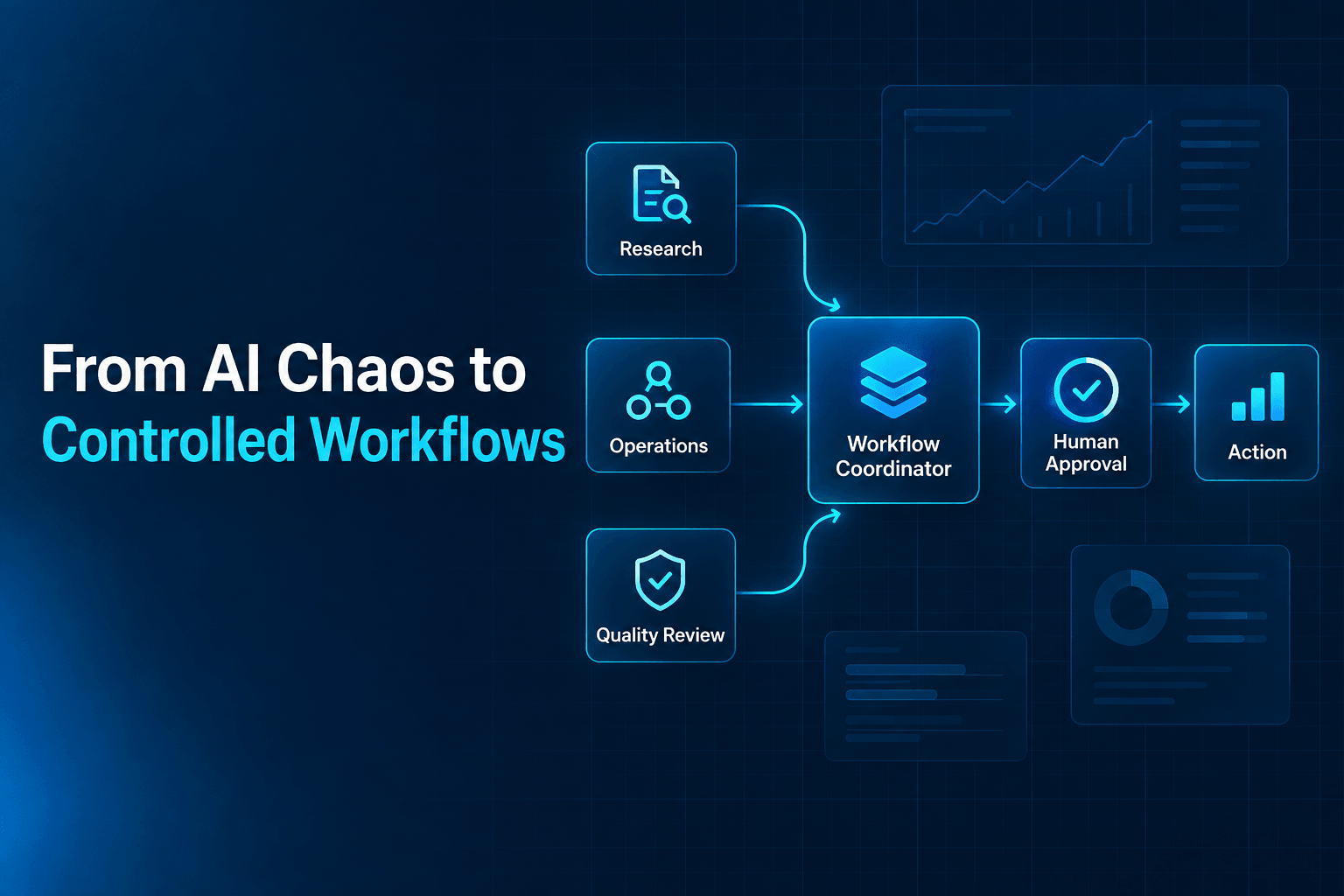
Most governed AI workflows have four parts:
- A coordinator agent
- Specialist agents
- A controlled shared-context layer
- Human approval gates
Together, they create a workflow that is easier to understand, test, and scale.
1. The coordinator agent: route work, do not do all the work
The coordinator receives the request, tracks workflow state, and decides what happens next. It identifies the appropriate specialist, passes along only the needed context, checks whether a task is complete, and routes exceptions to the right person.
Its job is orchestration, not doing every task itself.
For example, a coordinator might send a new lead to a research agent, pass verified findings to a qualification agent, and create a review task once an outreach draft is ready. Separating routing logic from specialist work makes the system easier to inspect and change.
2. Specialist agents: one role, bounded tools, measurable output
Specialist agents work best with narrow responsibilities, limited tools, and outputs that can be checked.
A lead-management workflow might include:
- Research agent: gathers company information from approved sources and notes gaps in the record.
- CRM agent: validates field formats and structures the lead record.
- Qualification agent: applies documented scoring criteria.
- Outreach agent: drafts a personalized message using approved context.
- Quality-review agent: checks the draft for completeness, tone, and policy requirements.
The same pattern works across departments. A publishing process, for example, can use separate planning, drafting, editing, and compliance roles, as described in our guide to building an AI agent team for content creation.
3. Shared context: give agents the right information, not all information
Context is not simply everything in the database.
A well-designed shared-context layer gives each agent what it needs for its step: the workflow goal, the relevant customer record, approved knowledge-base content, source citations, and earlier workflow decisions.
This is a least-privilege approach. It helps protect sensitive data, reduces irrelevant context, and makes an agent’s output easier to evaluate.
An outreach agent may need an approved lead summary and messaging guidelines. It probably does not need access to billing history, internal HR notes, or the entire CRM.
4. Approval gates: automate preparation, not unreviewed consequences
A human approval gate is a deliberate workflow checkpoint. It pauses a process so a person can review, edit, approve, reject, or escalate a proposed action before it occurs.
The agent can do the preparation: collect evidence, draft a recommendation, populate fields, and explain why it reached a conclusion. The person keeps authority over consequential decisions.
That is not a sign that automation has failed. It is what makes human-in-the-loop automation workable in a real business environment.
Where human approval gates belong
Not every step needs review. Requiring a person to approve every low-risk action creates bottlenecks and removes much of automation’s value.
Instead, decide whether a gate is needed based on the impact of the action.
| Action type | Recommended handling | Example |
|---|---|---|
| Reversible and internal | Usually automate | Categorize an inbound request or create a draft summary |
| Low-risk data preparation | Usually automate with logging | Flag missing fields or update a staging table |
| External communication | Require approval by default | Send a prospect email or customer response |
| Financial, legal, or contractual change | Require approval | Modify pricing, issue a refund, or accept contract terms |
| Sensitive data access or modification | Require approval or strict policy controls | Update protected customer information |
| Irreversible production action | Require approval | Delete records, publish content, or deploy a system change |
Use approval gates before irreversible, external, or high-risk actions
Put a human reviewer in the loop before an agent:
- Sends a customer-facing or prospect-facing message
- Publishes public content
- Changes pricing, contracts, payment information, or budget commitments
- Places an order or spends money
- Deletes data or updates production systems
- Accesses or modifies sensitive records
- Makes a hiring, performance, medical, legal, or financial recommendation
The reviewer should see the proposed action, the information used to produce it, and any uncertainty or policy flags. That provides enough context for an informed decision instead of a rubber stamp.
Let agents proceed automatically on reversible, low-risk tasks
Agents are often well suited to work such as:
- Collecting facts from approved sources
- Categorizing inbound requests
- Drafting internal summaries
- Formatting records for review
- Updating a staging table
- Flagging incomplete information
- Creating a task for a human owner
The distinction is simple: automate preparation aggressively, but be intentional about automating consequences.
Design principle: Treat human review as a workflow primitive, not an emergency brake. When approval requirements are designed upfront, teams can automate low-risk work with greater confidence.
A practical example: lead qualification with final human review
Consider a common sales-operations workflow: qualifying an inbound lead and preparing a response.
It is a good fit for multi-agent collaboration because it contains distinct tasks, different data needs, and a consequential final action: contacting someone outside your organization.
Step 1: Intake agent captures and normalizes the request
A form submission, inbound email, or CRM trigger starts the workflow. The intake agent checks required fields, identifies the organization, records the stated need, and applies an initial category such as enterprise, small business, partner, or support inquiry.
If essential information is missing, it creates a follow-up task rather than guessing.
Step 2: Research agent enriches the lead from approved sources
The research agent gathers permitted company and market context. It may identify the organization’s website, industry, location, public product information, and other relevant details.
Crucially, it should cite its sources or label information as unavailable. An agent should never invent a fact merely to make a record look complete.
Step 3: Qualification agent applies the team’s rules
The qualification agent compares the record with explicit scoring criteria: target industry, territory, company size, stated use case, urgency, or fit with the product offering.
Its output should be structured and explainable:
- Qualification score
- Criteria met
- Criteria not met
- Missing information
- Recommended next step
Step 4: Outreach agent prepares a draft, not an automatic send
Using the approved lead summary and messaging guidelines, the outreach agent drafts an email, suggests a call to action, and prepares CRM notes.
The message can be personalized, but it should not introduce claims that are unsupported by the available context.
Step 5: A human reviewer approves, edits, rejects, or escalates
A sales or operations owner receives the draft with the research summary and qualification rationale. They can approve the proposed email, edit it, reject it, or route it for a different action.
Only after approval does the workflow send the email or advance the CRM stage.
Intake → Research → Qualification → Draft → Human Approval → Send / Update CRM
For more ideas on applying agents to this process, see how AI agents are changing lead management.
When should you use multiple agents instead of one?
A multi-agent system is not automatically better. More agents mean more handoffs, more workflow logic, and more to evaluate.
Start with one agent when the work is simple
Use a single agent when the task has a clear outcome, relies on one or two tools, carries low risk, and does not need separate expertise.
For example, an agent that summarizes internal meeting notes and creates a task list may not need a coordinator and several specialists. A focused agent with a defined template may be easier to deploy and maintain.
Split into specialists when complexity is creating errors
Introduce specialist agents when you have evidence that one generalist is struggling. Common signals include:
- The prompt has become too long or contradictory
- One agent needs too many unrelated tools
- Different tasks need different permissions
- Quality problems appear at predictable stages
- Parts of the work can run safely in parallel
- Teams need clearer ownership or stage-specific metrics
- The workflow requires distinct review checkpoints
Start with the smallest architecture that works. Add orchestration only where it measurably improves quality, safety, speed, or visibility.
A launch checklist for governed AI automation
Before connecting a multi-agent workflow to live systems, confirm that you can answer these questions:
- Is there one measurable business outcome for the workflow?
- Does every agent have a narrow, documented responsibility?
- Does each agent have only the tools and data it needs?
- Is there a clear definition of a successful output at every stage?
- Are consequential actions protected by a human approval gate?
- Is there a fallback path for low confidence, ambiguous inputs, or failures?
- Are actions, handoffs, approvals, and exceptions logged?
- Has the workflow been tested against realistic edge cases?
- Are production permissions separate from staging or test permissions?
- Will the team review workflow performance and approval patterns regularly?
These questions support the broader shift toward agent-enabled work discussed in OpenAI’s overview of how agents are transforming work: the value comes not from autonomous activity alone, but from dependable systems that fit real teams and processes.
Build agent collaboration around trust, not just speed
The goal of multi-agent workflow design is not to create the most autonomous system possible.
It is to build a system that produces useful work consistently, makes handoffs understandable, protects important decisions, and improves over time. Specialist agents bring focus. Coordinators bring structure. Approval gates preserve accountability where it matters most.
Start with one repetitive business process. Assign clear roles. Restrict data and tool access. Then add a human approval gate before an external, costly, sensitive, or irreversible action.
That is how you move from AI chaos to controlled workflows without losing the human judgment your business depends on.
Frequently asked questions
What is a multi-agent workflow?
A multi-agent workflow is a process in which several AI agents have separate responsibilities, such as research, validation, drafting, and quality review. A coordinator or orchestration layer manages handoffs, tracks progress, and routes exceptions.
When do AI workflows need human approval gates?
Use approval gates before actions that are external, costly, difficult to reverse, sensitive, or dependent on human judgment. Common examples include sending customer communications, publishing content, editing important records, committing spend, or making high-impact recommendations.
Is a multi-agent system always better than one AI agent?
No. A single agent is often the better option for simple, low-risk tasks with a clear outcome. Use multiple agents when specialization, separate permissions, parallel work, or clearer quality control will improve the result.
What should a coordinator agent do?
A coordinator agent should interpret the workflow goal, delegate tasks to the appropriate specialist, track workflow state, and route exceptions to a person. It should not receive unrestricted access to every tool or system by default.
Related Articles
Continue exploring more insights on ai agents