How to Turn a Lead Intake Form Into an Automated AI Follow-Up System
Turn every lead form into an AI follow-up engine that qualifies, routes, and books meetings faster, without extra manual work.
What if your lead form isn’t the top of your funnel problem at all?
Because the real leak usually starts after the form submit. A prospect fills it out, waits, gets a generic thank-you email, and then hears silence while your team is busy, asleep, or elbow-deep in Salesforce tabs. That gap is expensive. In Salesforce’s 2026 State of Sales survey, 87% of sales organizations said they already use AI in some part of sales, and sellers expect agents to cut prospect research time by 34% and email drafting by 36% Salesforce 2026 State of Sales. The point is not that AI is trendy. The point is that speed and relevance are now operational expectations, and your form is only innocent until proven otherwise.
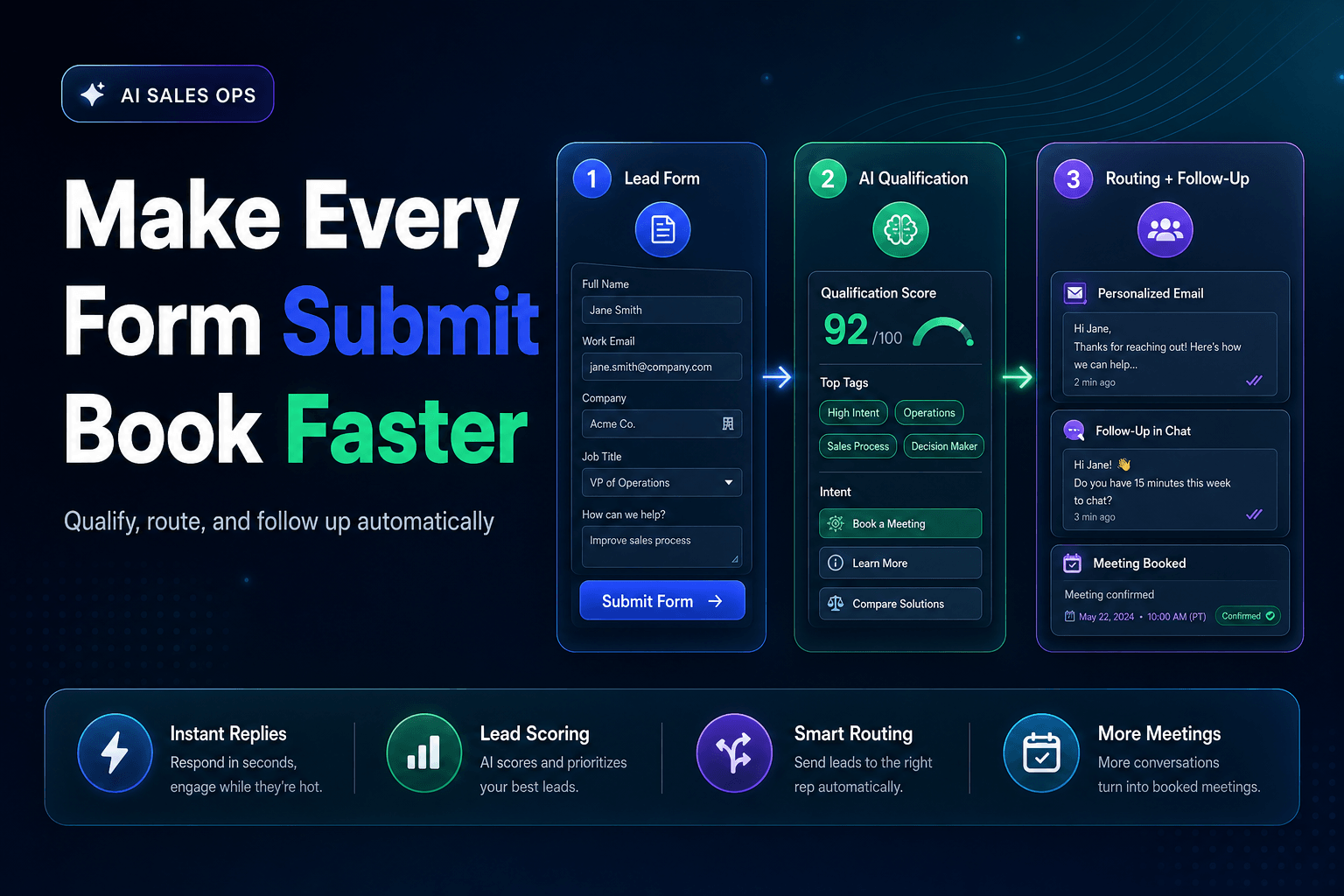
A lead intake form can do a lot more than collect name, email, and company size. If you design it properly, it becomes the trigger for an automated AI follow-up system that qualifies, routes, responds, and books next steps without making your sales team babysit every inquiry. We’ve found this works best when you stop thinking about the form as a database entry point and start treating it like the first move in a conversation.
Don’t optimize the form first, optimize the 10 minutes after it
Most teams obsess over reducing fields. That matters, sure. But the higher-friction moment is what happens immediately after submission.
A lead who just asked for pricing, a demo, or a callback is telling you when their intent is highest. If your process waits for manual assignment, rep availability, or a daily queue review, you’ve already fumbled the handoff. HubSpot’s guidance on lead response time says getting follow-up under 30 minutes materially improves conversion odds, and specifically calls out automation as the fastest way to respond immediately after capture HubSpot lead response time guide.
That means your follow-up architecture should be designed before you tweak a single form label.
Here’s the minimum viable chain:
- Capture intent from the form, not just contact details
- Enrich and classify the lead automatically
- Generate a personalized first response based on what they asked
- Route or escalate based on urgency and fit
- Book the next action while attention is still warm
A weak system says, “Thanks, we’ll be in touch.”
A strong system says, “Got it. You’re comparing tools for a 12-person sales team, need CRM integration, and want to launch this quarter. Here’s the fastest next step.”
That second version feels human because it uses context. The irony is that context is exactly what automation is best at when the workflow is set up correctly.
Ask five smarter questions, then let AI do the sorting
A good lead form should not feel like an interrogation, but it also shouldn’t act like a blank napkin. If all you collect is “Tell us about your needs,” your AI has very little to work with beyond guesswork and vibes.
We’ve found the best intake forms gather just enough structured data to make downstream decisions easy. Think less “more fields” and more “better variables.”
What to capture up front
Include fields that help your follow-up system answer four questions:
- Who is this? Role, company, team size
- Why now? Use case, urgency, current pain
- How should we respond? Preferred contact method, booking intent
- Where should this go? Sales, support, partnership, recruiting, or spam
A practical example:
| Field | Why it matters | AI follow-up use |
|---|---|---|
| Job role | Signals buying influence | Adjust tone and CTA |
| Team size | Indicates likely plan fit | Route by segment |
| Primary use case | Reveals pain and urgency | Personalize message |
| Timeline | Distinguishes research from active buying | Trigger fast-lane routing |
| Current tool or process | Adds comparison context | Tailor objections and examples |
This is where a platform like AffinityBots becomes useful. Instead of sending every submission into a generic inbox, you can build AI agents that interpret those inputs, match them to workflows, and kick off different actions automatically.
For example:
- A founder selecting “need automation this month” can receive an instant booking prompt
- A mid-market ops manager asking about integrations can get a tailored reply plus technical documentation
- A student or job seeker can be politely redirected without touching the sales queue
That’s not overengineering. That’s protecting rep time.
Personalization is not “Hi Sarah,” it’s using the reason they came
This is where most AI follow-up systems get embarrassingly bad.
They personalize with merge tags, not relevance. So the lead gets an instant email that includes their first name, but ignores the fact that they asked about enterprise security, multi-step approvals, or after-hours routing. Congratulations, the robot found {{first_name}} and missed the plot.
According to McKinsey’s 2025 State of AI survey, more than two-thirds of respondents said their organizations use AI in more than one function, and half use it in three or more. The highest reported revenue gains are showing up in marketing and sales. That tracks with what actually works: AI creates value when it acts on business context, not when it spits out prettier boilerplate.
Your first response should reflect three things:
1. The lead’s stated goal
If they asked for help automating follow-up for demo requests, don’t send a broad “thanks for contacting us” note.
2. The likely next step
Some leads need a calendar link. Others need a short answer, a case-study-style explanation, or a triage question before a call makes sense.
3. The confidence level of the system
If your AI is unsure whether the inquiry is sales, support, or procurement, it should ask one clarifying question instead of pretending it knows.
A solid first-touch message often includes:
- One sentence confirming what the lead asked for
- One useful next step
- One optional alternative path
That structure keeps it responsive without feeling canned. It also gives your AI a narrow job: move the conversation forward, not close the deal in email one.
Don’t send every lead to sales right away
This is the mildly contrarian part.
A lot of teams think automation means instant handoff to a rep. In reality, sending every form fill directly to sales is how you create noise, burnout, and sloppy follow-up. The fix is not “more SDR hustle.” It’s better pre-qualification.
HubSpot’s 2025 State of Sales reporting found 68% of teams said lead quality improved year over year, while 74% of sales pros believe AI is making it easier for buyers to research products before talking to a seller HubSpot 2025 State of Sales. Translation: by the time many buyers fill out your form, they may already know what they want. But others are still browsing, comparing, or poking around for a PDF.
Treating both groups the same is a mistake.
A better model is tiered follow-up:
High intent:
pricing request, demo request, launch timeline under 30 days
-> immediate AI response
-> instant owner assignment
-> meeting booking or rep alert

Medium intent:
use-case question, integration question, timeline this quarter
-> AI response with tailored resources
-> qualification question
-> delayed rep task if engaged

Low intent:
general inquiry, student research, vague contact request
-> polite AI triage
-> nurture or redirect
This is especially important if your team is small. AffinityBots’ workflow model lets you create different follow-up paths without coding, so your salespeople only jump in where the odds justify human attention. If you want teams to explore that without a giant commitment, AffinityBots pricing starts with a free plan and includes unlimited AI agents, which is handy when you want separate workflows for demo leads, support requests, and partnership inquiries.
The reason AI follow-up systems fail is boring, and fixable
The biggest failure mode is not bad prompting. It’s bad operations.
Salesforce published a blunt take on this in late 2025: 95% of enterprise generative AI pilots fail to show demonstrable ROI, and the recurring issue is that teams bolt AI onto messy processes instead of embedding it into the actual flow of work Salesforce on why AI pilots fail.
We’ve seen the same pattern at a smaller scale. Teams build an AI autoresponder, feel clever for a week, then realize:
- it answers too generically
- nobody defined qualification rules
- reps don’t trust the outputs
- there’s no escalation path
- no one is measuring booked meetings, reply rates, or qualified pipeline
That’s how a “smart” system becomes expensive wallpaper.
What to measure instead
Do not judge the system by open rates alone. Measure it like an operator.
Track:
- Time to first meaningful response
- Reply rate by lead source
- Meeting booked rate
- Qualified opportunity rate
- Human takeover rate
- Bad routing rate
If your AI replies in 40 seconds but creates junk meetings, it’s not working. If it cuts rep workload by filtering low-intent leads and increases booked calls from high-intent ones, then it’s doing its job.
This is why governance matters. The system needs clear rules for when to answer, when to ask, when to route, and when to stop.
Build the workflow once, then let it run every day
The best part of an AI follow-up system is not the first email. It’s the consistency.
Humans are inconsistent by default. We have lunch. We miss notifications. We forget to tag records. We say “I’ll follow up later” and then later becomes Thursday somehow. An automated system does not get distracted.
A practical lead intake workflow often looks like this:
- Form submission
- Lead enrichment from known fields and internal data
- Intent scoring using timeline, use case, and company profile
- AI-generated response with a tailored CTA
- Branching logic for routing, nurture, or escalation
- CRM update and task creation
- Follow-up sequence if the lead does not reply
With AffinityBots, you can build that as a set of intelligent workflows instead of stitching together five tools and praying the Zap still works next Tuesday. If you need custom integrations, advanced security, or more complex deployment options, AffinityBots enterprise solutions also support custom workflows and on-premise options.
One more thing: keep a human checkpoint in the system. Not for every lead, but for edge cases. If someone asks a pricing question that hints at procurement complexity, or a support issue arrives through the sales form, your AI should know when to pass the baton instead of freelancing.
That’s the sweet spot. Fast where speed matters, human where nuance matters.
Turning a lead intake form into an automated AI follow-up system is less about adding flashy AI features and more about removing dead time, ambiguity, and manual triage. The form becomes the trigger. The workflow becomes the engine. The AI becomes the layer that makes each response feel timely and specific instead of robotic.
If you want to build that kind of system without writing code or duct-taping together six apps, start with AffinityBots. You can spin up custom AI agents, automate lead routing and follow-up, and test the workflow on a free plan before you scale. Your form already captures demand. Now give it a better second act.
Related Articles
Continue exploring more insights on sales automation