
What is Memory
Understand how AI agents remember past conversations to provide personalized and consistent interactions.
Memory allows your AI agent to remember information from past conversations, providing more personalized and context-aware interactions over time.
How Memory Works
When memory is enabled, your agent:
- Extracts important information from conversations
- Stores these memories persistently
- Retrieves relevant memories in future conversations
- Uses this context to provide better responses
Unlike knowledge (which you upload), memories are learned automatically from conversations.
Memory vs Knowledge
| Aspect | Memory | Knowledge |
|---|---|---|
| Source | Learned from conversations | Uploaded documents |
| Content | User preferences, past topics, context | Reference material, data |
| Updates | Automatic | Manual upload |
| Purpose | Personalization | Information retrieval |
What Gets Remembered
Your agent automatically extracts and remembers:
- User preferences: "I prefer detailed explanations"
- Personal context: "I work in marketing"
- Past decisions: "We decided to use React for the frontend"
- Important facts: "The project deadline is March 15th"
- Conversation topics: Key subjects discussed
Enabling Memory
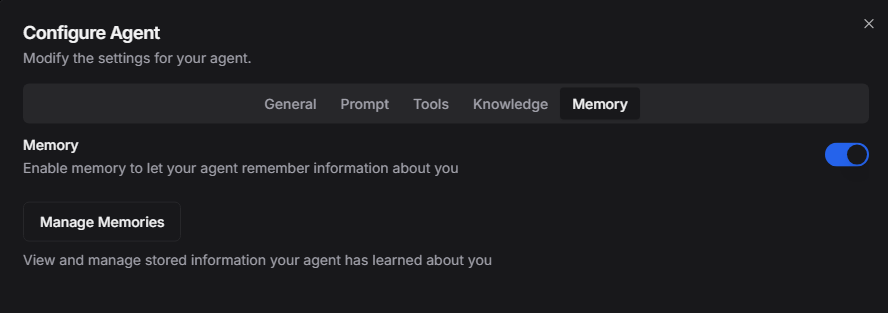
Memory is enabled by default for new agents. To manage this setting:
- Open your agent's configuration
- Navigate to the "Memory" tab
- Toggle "Enable Long-Term Memory" on/off
Viewing Memories
To see what your agent remembers:
- Open agent configuration → Memory tab
- View the list of stored memories
- Each memory shows:
- The extracted information
- When it was learned
- Source conversation
Managing Memories
Editing Memories
If a memory is incorrect:
- Find the memory in the list
- Click Edit
- Correct the information
- Save changes
Deleting Memories
To remove a memory:
- Find the memory in the list
- Click the trash icon
- Confirm deletion
[!TIP] Regularly review memories to ensure your agent has accurate information.
Clearing All Memories
To start fresh:
- Go to Memory tab
- Click "Clear All Memories"
- Confirm the action
[!WARNING] Clearing memories cannot be undone. The agent will lose all learned context.
How Memory Improves Responses
Without Memory
User: What framework should I use?
Agent: There are many options like React, Vue, Angular...

[New conversation]

User: Should I add TypeScript?
Agent: TypeScript is a good choice for many projects...
(No context from previous conversation)
With Memory
User: What framework should I use?
Agent: There are many options like React, Vue, Angular...

[New conversation]

User: Should I add TypeScript?
Agent: Since you chose React for your project, adding TypeScript
would be a great choice. It integrates well with React...
(Remembers previous decision)
Memory Best Practices
Regular Maintenance
- Review monthly: Check that memories are accurate
- Remove outdated info: Delete memories that are no longer relevant
- Correct errors: Fix any misremembered information
Privacy Considerations
- Avoid sensitive data: Don't share highly sensitive information
- Clear when needed: Remove memories before changing agent purpose
- Review shared agents: Check memories if sharing agent access
Optimal Usage
| Do | Don't |
|---|---|
| Let agent learn preferences naturally | Overload with personal information |
| Correct inaccurate memories | Ignore incorrect memories |
| Clear memories for fresh starts | Keep outdated information |
| Review before important conversations | Assume all memories are accurate |
Memory and Workflows
When agents are used in workflows:
- Shared threads: Memories can span the workflow
- Isolated tasks: Each task starts fresh
- Manager/hub tasks: Tasks that delegate to other agents may access those agents’ memories when configured
Configure context control in workflow tasks to manage how memory is used.
Troubleshooting
Agent not remembering
- Verify memory is enabled
- Check if the information was significant enough to extract
- Try explicitly stating important information
- Review if memory was accidentally deleted
Incorrect memories
- Edit or delete the incorrect memory
- Provide correct information in a new conversation
- The agent will learn the updated information
Too many memories
- Review and prune unnecessary memories
- Delete outdated information
- Focus on keeping essential context
Related Guides
- What is Knowledge - Document-based knowledge
- Configuring your Agent - Agent setup
- Introduction to Workflows - Using agents in workflows