AI Agent Orchestration Best Practices for 2026
Learn how to orchestrate AI agent teams with clear roles, guarded tools, human approvals, and measurable workflows that scale.
AI Agent Orchestration Best Practices for 2026
A single AI agent can summarize a document, draft an email, or answer a question. Business work rarely ends there.
A real workflow needs the right information, the right system access, clear quality checks, an accountable owner, and a plan for exceptions. It may need to update a CRM, check a policy, flag a low-confidence decision, or wait for a person to approve an external action.
That is where AI agent orchestration comes in.
Teams getting value from agentic automation are not putting a group of bots in a chat and hoping they coordinate. They are designing a dependable operating system for work: specialized roles, deliberate handoffs, constrained tools, human approvals where risk is high, and measurements that show whether the workflow is actually improving outcomes.
This guide covers the AI agent orchestration practices that help teams build multi-agent workflows that are useful, observable, and safe enough to scale.
What Is AI Agent Orchestration?
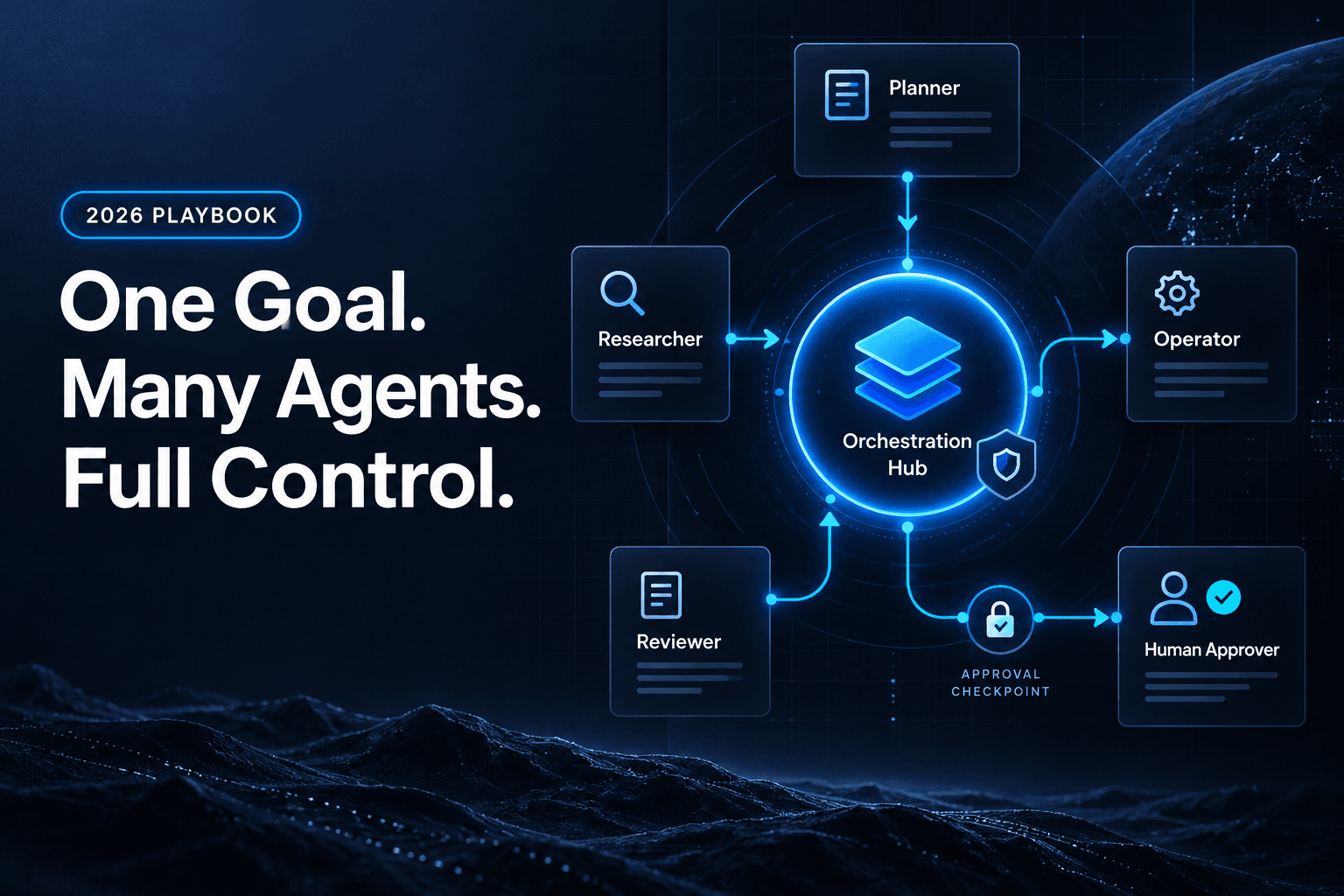
AI agent orchestration is the coordination of AI agents, tools, data sources, business rules, and people toward a defined outcome.
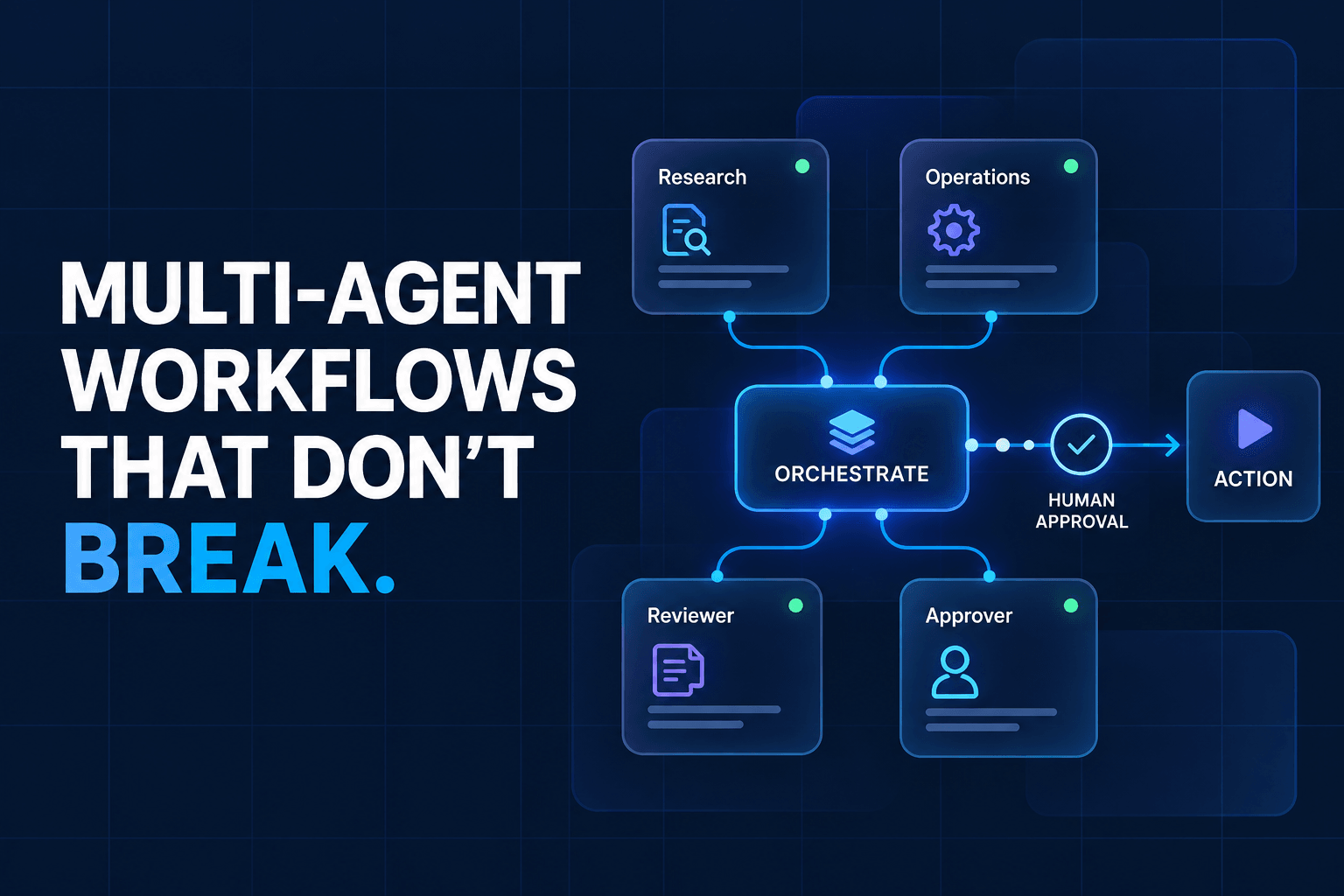
Think of it as workflow management for AI-powered work. An orchestrator decides what happens next, which agent receives the task, what context it needs, what conditions must be met, and when a human should step in.
There is an important distinction between these concepts:
- An AI assistant responds to a person’s request.
- A task-focused AI agent can take steps toward a narrow goal, such as classifying support tickets.
- A multi-agent workflow coordinates several specialized agents and systems across a larger process.
As IBM’s overview of AI agent orchestration explains, orchestration provides the coordination layer that lets specialized agents work together instead of operating as disconnected tools.
Not every workflow needs multiple agents. If a task is predictable—such as copying a form field into a spreadsheet—traditional automation is usually the better choice. Add agents when a process requires judgment, unstructured information, different areas of expertise, or meaningful review.
Why Multi-Agent Workflows Are Replacing “One Agent Does Everything”
The appeal of one general-purpose agent is obvious: give it a goal, connect a few tools, and let it work. In practice, broad goals paired with broad permissions create ambiguity.
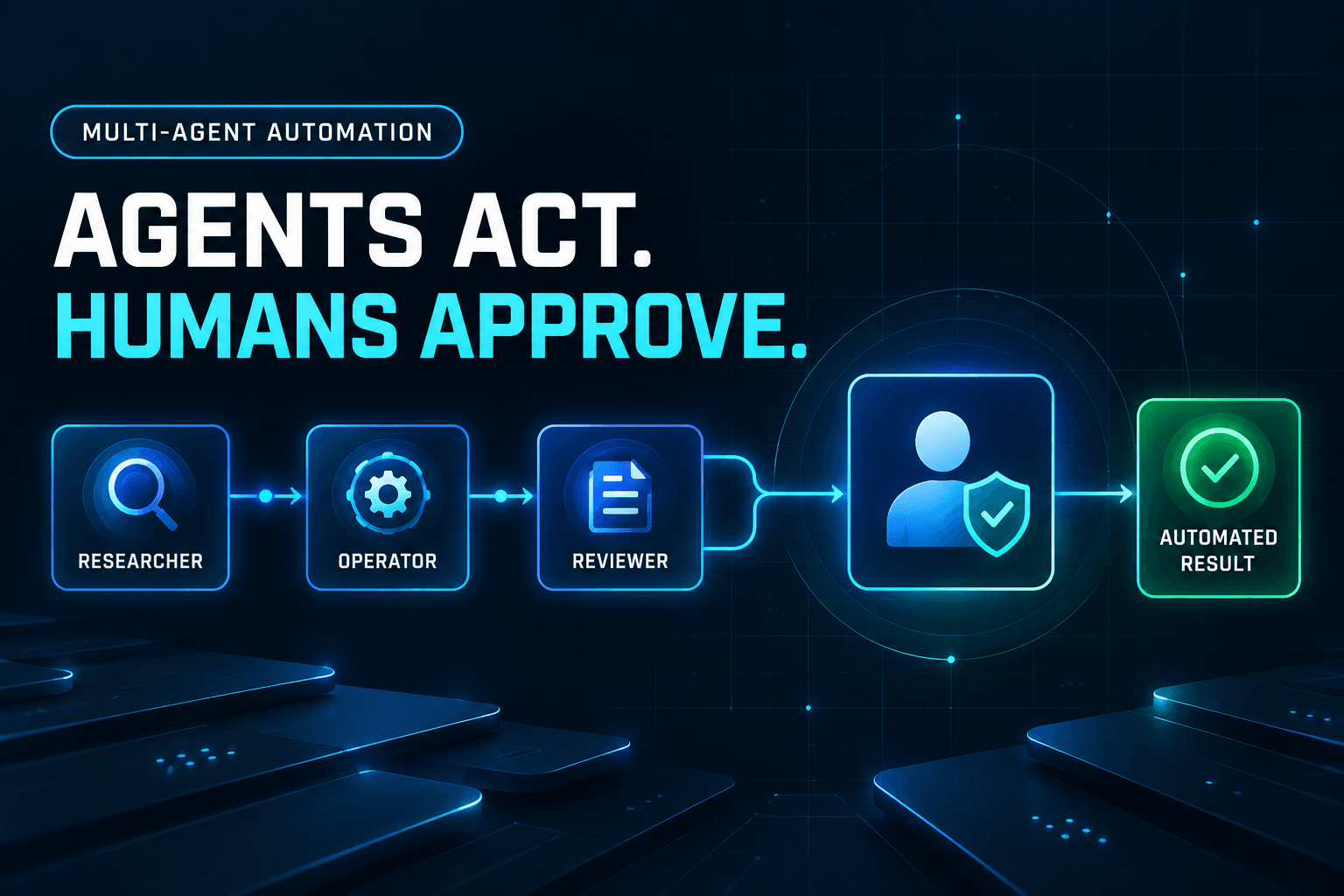
A multi-agent workflow separates responsibilities:
- A research agent gathers evidence from approved sources.
- An operations agent updates the correct system of record.
- A review agent checks work against policy or quality criteria.
- A human approver authorizes consequential actions.
That separation makes it less likely that an agent will decide with incomplete information, reach into an unrelated system, or bury an error in a long chain of reasoning.
It also makes failures easier to diagnose. If a sales brief is inaccurate, was the problem in research, qualification logic, the final draft, or the approval process? Clear handoffs make the answer easier to find.
The best multi-agent workflow does not resemble an uncontrolled digital workforce. It resembles a well-run team playbook: every role has a purpose, routine actions follow established rules, exceptions have an owner, and the final decision-maker is clear.
7 AI Agent Orchestration Best Practices
1. Start with one measurable business outcome
Begin with a workflow that has a clear trigger, finish line, owner, and metric.
Good starting points include:
- Qualifying inbound leads
- Categorizing and routing support tickets
- Producing weekly operations summaries
- Drafting and reviewing content briefs
- Preparing account research before a sales call
Avoid objectives such as “make the team more productive.” They are too broad to design, test, or measure.
Instead, set a specific target: “Reduce the time from lead submission to a sales-ready brief from two business days to two hours while maintaining an 85% reviewer approval rate.”
A narrow starting point keeps the workflow understandable and gives you a baseline for improvement. For ideas, explore these repetitive tasks worth automating with AI agents.
2. Give every agent one clearly bounded responsibility
Every agent needs a documented job description. At minimum, define:
- Inputs: What information does it receive?
- Output: What must it produce, and in what format?
- Allowed tools: Which sources or systems can it use?
- Limits: What must it never do?
- Escalation rules: When must it ask for help or route work onward?
- Quality standard: How will you judge a successful result?
Role overlap is a common source of weak workflows. If two agents both research, score, and draft a recommendation, they may duplicate work or produce conflicting answers. Clear specialization creates cleaner handoffs and makes testing more useful.
For a deeper role-design framework, see this step-by-step multi-agent workflow blueprint.
3. Use an orchestrator to control handoffs—not just prompts
A prompt tells an agent how to approach its task. An orchestrator controls the workflow around that task.
It should determine:
- Which agent acts next
- What context is passed forward
- Which conditions must be satisfied before advancing
- Where the workflow stops
- When to route an exception to a person
For example:
- If a lead record is missing a company name, request the missing detail rather than score it.
- If the qualification agent’s confidence is below a threshold, send the record to human review.
- If a tool call fails twice, stop the workflow and create an exception ticket.
- If a final recommendation is approved, update the CRM; otherwise, retain the draft for revision.
Explicit stop conditions matter. Without them, agents can repeat work, continually request more information, or loop through the same handoff.
4. Keep deterministic tasks deterministic
Not every step needs AI reasoning.
Use standard workflow automation for predictable actions such as assigning labels, validating required fields, updating a spreadsheet, creating a ticket, or sending a pre-approved internal notification. These steps are faster, cheaper, and easier to audit when they are rules-based.
Reserve AI for work that benefits from interpretation or judgment, including:
- Understanding a nuanced customer inquiry
- Summarizing a set of documents
- Extracting themes from notes
- Drafting a tailored response
- Identifying an exception that does not fit normal rules
This hybrid design is one of the most practical multi-agent workflow practices. AI should handle ambiguity; deterministic automation should handle repetition.
5. Apply least-privilege access to every tool
An agent should receive only the access it needs to complete its assigned job.
Separate permissions for reading, writing, publishing, sending, granting access, and making payments. A research agent may need read-only access to a knowledge base. It should not need permission to send customer emails or change CRM ownership.
This matters even more when agents encounter untrusted content. A workflow that combines private-data access, instructions from external webpages, and the ability to take outward-facing actions needs strong safeguards.
The growing focus on production-ready agents has made security controls, scoped tools, and deliberate context management key evaluation criteria, as noted in Mastra’s overview of AI agents in 2026.
6. Put humans at consequential decision points
Human-in-the-loop AI automation does not mean asking for approval after every small step. It means placing people where the risk justifies review.
Typical approval points include:
- Sending external communications
- Publishing public content
- Changing important customer or employee records
- Granting access to systems or data
- Making financial, legal, or contractual commitments
- Handling low-confidence or policy-conflicting cases
The goal is risk-based oversight. A human should not have to approve every internal label assignment, but they may need to approve a high-value account recommendation before outreach begins.
Make the escalation path clear. If an agent has insufficient evidence, conflicting information, or a policy issue, it should route the work to a defined owner—not try to reason its way past the boundary.
7. Evaluate the workflow—not just the model
A capable model does not guarantee a capable workflow. Measure the end-to-end system.
Track metrics such as:
- Task completion rate
- Reviewer approval or quality-pass rate
- Correction and rework rate
- Time to completion
- Cost per completed outcome
- Human intervention rate
- Escalation frequency
- Business results, such as qualified leads or faster resolution
When something fails, review the stage where it failed: retrieval, decision-making, tool execution, handoff, or final approval. That tells you what to improve.
Test realistic edge cases before a broad rollout. Include incomplete records, conflicting facts, ambiguous requests, tool outages, and attempts to push the workflow outside its intended scope.
A Practical Multi-Agent Workflow: From Lead Intake to Sales-Ready Brief
Consider a workflow for preparing inbound leads for a sales team.
- A lead intake agent reads a form submission, email, or meeting note and extracts the relevant details.
- A research agent enriches the account using approved sources.
- A qualification agent scores fit against documented criteria.
- A briefing agent prepares a concise account summary, risks, and suggested next step.
- A reviewer or human approver confirms the recommendation before any external outreach occurs.
- The orchestrator records the outcome, updates the appropriate systems, and routes exceptions to a human owner.
This workflow is reliable because no one agent owns everything. Research is separate from qualification. Qualification is separate from external communication. A person can review high-value, uncertain, or unusual cases.
For more examples, see how AI agent workflows for lead management can reduce administrative work while preserving sales-team judgment.
Do not automate the relationship. Automate the preparation, routing, and repetitive follow-through around the relationship.
How to Choose an AI Agent Orchestration Platform
When evaluating an AI agent orchestration platform, look beyond impressive demos. Ask whether the platform supports the operational controls your workflow needs.
Use this checklist:
- Can teams define agent roles, handoffs, and conditional routing without extensive custom code?
- Can agents use approved tools and knowledge sources with granular permissions?
- Are human approvals available at the right workflow stages?
- Can operators inspect execution history, outputs, decisions, and failures?
- Can workflows be tested before they reach production?
- Does the platform connect to the systems your team already uses?
- Can you begin with one low-risk workflow and expand carefully?
A platform should help teams make automation visible and governable—not hide critical decisions behind a black box. As IBM’s discussion of multi-agent orchestration highlights, coordinating agents with existing tools, data, and business processes is central to making these systems useful in practice.
A 30-Day Plan for Your First Multi-Agent Workflow
Week 1: Select and map one workflow
Choose a repeatable process. Document its trigger, inputs, actions, exceptions, owner, and success metric. Identify which steps require judgment and which are purely deterministic.
Week 2: Create roles and guardrails
Define each agent’s scope, inputs, outputs, tools, permissions, and escalation rules. Add approval gates for consequential actions.
Week 3: Test realistic and adversarial cases
Run the workflow against incomplete data, unclear requests, conflicting sources, unusual cases, and tool failures. Check that it stops safely and routes exceptions correctly.
Week 4: Launch with review and measurement
Start with a limited team, a lower-risk queue, or a subset of cases. Review outcomes weekly, then refine instructions, routing rules, approval thresholds, and tool permissions using evidence from actual runs.
FAQ: AI Agent Orchestration
What is the difference between an AI agent and AI agent orchestration?
An AI agent performs tasks toward a goal. AI agent orchestration coordinates multiple agents, tools, data sources, rules, and people across a broader workflow.
When should a business use multiple AI agents?
Use multiple agents when a process has distinct specialties, permissions, systems, or quality checks. For a simple, predictable task, use one agent or standard automation instead.
Do multi-agent systems need a human in the loop?
Not for every action. Human review is most important for high-impact, low-confidence, customer-facing, financial, legal, or access-control decisions.
How do you measure whether an agent workflow is working?
Measure completion rate, quality, exception rate, intervention rate, speed, cost, and the business outcome the workflow was built to improve.
What is the biggest mistake teams make with agentic automation?
Giving an agent broad access and an ambiguous goal without clear boundaries, approval gates, logs, or evaluation criteria.
Build Agent Teams That Improve Work—Not Complexity
Effective AI agent orchestration is operational design, not just prompt design.
Start with one meaningful workflow. Give every agent a focused role. Keep routine actions deterministic. Limit tool access. Add human approval where consequences are real. Then measure the outcome before expanding.
Build your first governed AI agent workflow with AffinityBots and turn a repeatable business process into a visible, collaborative system your team can trust.
Related Articles
Continue exploring more insights on artificial intelligence