Multi-Agent Workflow Orchestration: A 2026 Playbook for Governed AI Automation
Learn how to orchestrate AI agents with clear roles, guardrails, approvals, and measurable outcomes in this practical 2026 playbook.
Multi-Agent Workflow Orchestration: A 2026 Playbook for Governed AI Automation
The next AI advantage will not come from deploying the most agents. It will come from knowing which agent should decide, which should act, and when a person needs to step in.
Teams are moving past isolated chatbots and one-off automations. They are building agent teams that can research, plan, execute, review, and escalate work across real business processes. But adding agents without a clear design creates a different problem: agent sprawl—overlapping responsibilities, unclear permissions, inconsistent outputs, and no dependable record of why a decision was made.
Governed multi-agent workflow orchestration is the alternative. It uses specialized roles, structured handoffs, controlled tool access, and measurable outcomes to make automation useful without making the process harder to manage. This guide shows how to design that kind of system without turning it into an oversized experiment.
Why Multi-Agent Workflow Orchestration Matters Now
Multi-agent workflow orchestration is the coordination of specialized AI agents, tools, data sources, and human approvers to complete a shared business process.
That is different from simply using an AI assistant:
- An AI assistant answers questions or helps draft content.
- An autonomous agent can use tools to complete a bounded task.
- A multi-agent workflow gives several agents distinct, limited responsibilities and routes their outputs through a defined process.
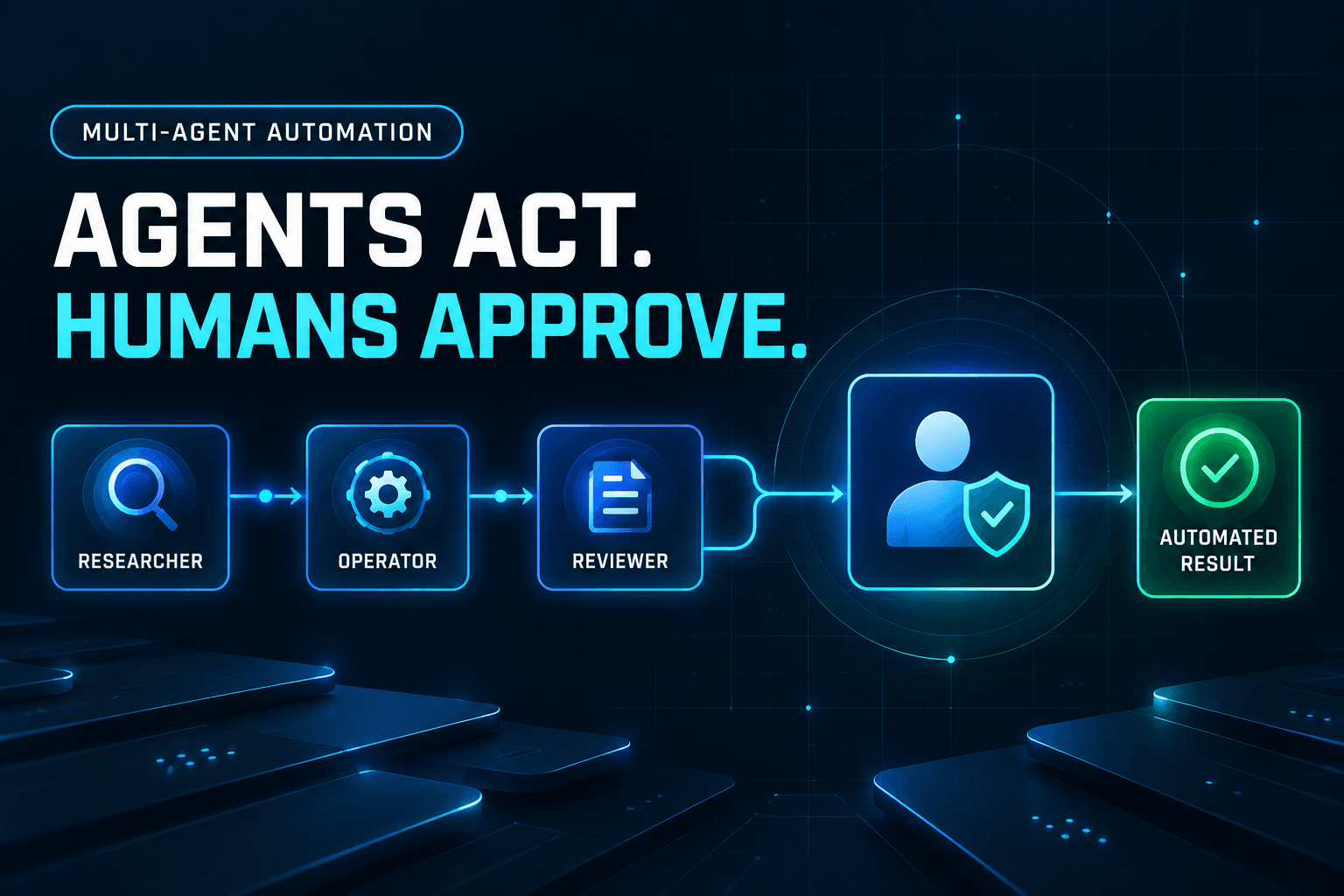
For example, one agent might research a prospect, score the account, draft outreach, and update a CRM. A governed workflow separates those duties: one agent researches approved sources, another standardizes data, another applies scoring rules, and a reviewer validates the result before anyone approves outreach.
This reflects a broader shift in agentic architecture. IBM’s overview of AI agents notes that useful agent systems need more than language generation. They also need planning, tool use, memory or state, governance, and defined constraints.
Real workflows do not end with one clean request and one perfect response. They include missing data, exceptions, approvals, retries, and decisions with consequences. Orchestration gives each of those moments a defined place in the process.
The 5 Trends Shaping Multi-Agent Automation in 2026
1. Specialized roles are replacing “one-agent-does-everything” designs
The best agent is not always the one that can do the most. It is often the one with the clearest job.
In lead qualification, for example, a research agent can gather company details, an enrichment agent can normalize fields, a scoring agent can apply qualification criteria, and a human reviewer can approve high-value accounts. Each role is narrow enough to test, troubleshoot, and improve.
Specialization also reduces the blast radius of a mistake. If the research agent returns incomplete data, you can refine its source rules without rewriting the scoring logic or the customer-outreach process.
2. Orchestration layers are becoming the control center
An agent team needs an operating model, not a collection of prompts.
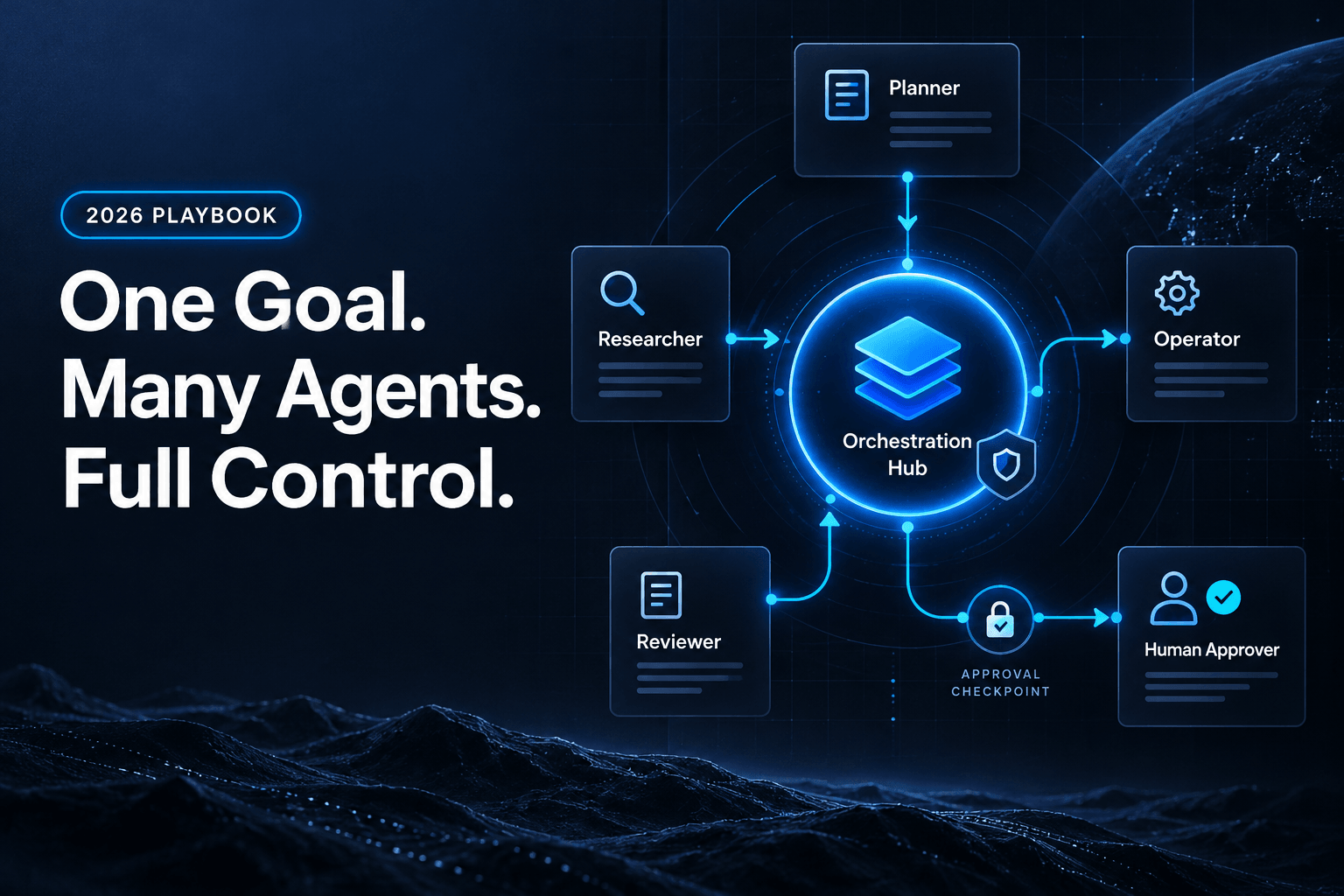
The orchestrator is the workflow layer that determines task order, stores workflow state, manages retries, routes exceptions, and logs decisions. It should know which step is in progress, what information is missing, and which person or agent owns the next action.
Without that control layer, teams often end up with brittle chains of prompts and integrations. With it, they can make the process inspectable and repeatable.
3. Governance-as-code is moving upstream
Governance should not be an audit step that happens after an agent has sent the email, changed the record, or triggered the payment.
Instead, build guardrails directly into the workflow logic:
- Give each agent only the tools and data it needs.
- Require approval before high-impact actions.
- Set spending, action-volume, or confidence thresholds.
- Define escalation paths for low-confidence or incomplete results.
- Keep an audit trail of inputs, outputs, and decisions.
This is especially important as tool-connected agents become more common. The goal is not to eliminate autonomy; it is to make autonomy proportional to the risk of the action.
4. Context engineering is becoming operational infrastructure
Reliable agents do not need unlimited access to every document, drive, database, and conversation. They need the right context: current, relevant, structured, and permissioned.
A lead-scoring agent should receive approved account fields and scoring rules, not a dump of every sales note your company has collected. A policy-review agent should see the applicable policy version, not conflicting drafts from three years ago.
Better context design often improves results more than adding another agent or switching models.
5. Agent performance must be measured as a workflow
Do not judge a multi-agent system by how impressive one response sounds. Measure whether the workflow produces dependable business outcomes.
Start with operational metrics:
- Completion rate
- Validation pass rate
- Exception rate
- Human-intervention rate
- Turnaround time
- Cost per completed task
Then connect them to the purpose of the workflow: faster lead response, fewer data-entry errors, improved resolution time, or more qualified opportunities. Orchestration and data quality matter because they make those outcomes observable, not merely aspirational.
First, Decide Whether You Actually Need Multiple Agents
More agents mean more coordination. Before creating a team, make sure the workflow genuinely benefits from one.
Use one agent when:
- The task is simple, linear, and low risk.
- One agent can complete it using one or two tools.
- There are few handoffs.
- The final result is easy to check with a rule or a quick human review.
For example, summarizing a call transcript into a standard CRM note may need only one well-designed agent.
Use multiple agents when:
- The process contains genuinely distinct expertise or responsibilities.
- Steps require different permissions, tools, or data sources.
- A second agent can independently validate an important result.
- The workflow has predictable exceptions or approval points.
- Work can run in parallel, such as research across several approved sources.
Use human approval when:
- An action affects customers, finances, contracts, production systems, or sensitive data.
- The workflow has low confidence or missing information.
- The outcome cannot be reliably validated against clear business rules.
- The action is difficult to reverse.
A practical rule is Autonomy × Impact: as the impact of an action increases, the workflow should add more explicit review, approval, and escalation controls. Not every task needs a human in the loop, but every consequential action needs a clear accountability model.
A Practical Multi-Agent Workflow Architecture
A durable multi-agent workflow does not need dozens of agents. It needs clear roles and predictable handoffs.
1. The planner agent
The planner turns a business goal into a sequence of work. It identifies required inputs, selects the appropriate specialist, and recognizes when it lacks enough information to proceed.
For a customer-onboarding workflow, the planner might determine whether the request requires document collection, account setup, compliance review, or human escalation.
2. The specialist agents
Specialists perform tightly scoped tasks, such as:
- Researching approved public sources
- Extracting fields from documents
- Enriching CRM records
- Classifying requests
- Drafting content
- Executing a permitted tool action
A specialist should have a narrow purpose, defined data access, and a structured output. If its job description is vague, the workflow will be difficult to evaluate.
3. The reviewer agent
The reviewer checks work against explicit criteria instead of simply deciding whether an answer “looks good.” It can verify required fields, source citations, formatting, confidence thresholds, policy rules, or brand constraints.
A reviewer is particularly useful when a downstream action matters but can still be checked systematically.
4. The human approver
A human approver handles judgment calls, high-impact actions, and exceptions. This does not mean reviewing every trivial task. It means placing people where their context, accountability, and discretion add the most value.
The approver should receive a concise decision packet: what happened, what evidence supports the recommendation, what remains uncertain, and what action the workflow proposes.
5. The orchestrator
The orchestrator coordinates the entire system. It routes tasks, preserves state, triggers retries, applies policies, sends exceptions to people, and logs events for later evaluation.
Think of it as the workflow’s control tower. It does not need to perform every task itself; it makes sure the right task reaches the right role under the right conditions.
6. The shared workflow contract
Every handoff should include a structured contract:
- Objective: What must this step accomplish?
- Inputs: What data is required?
- Allowed tools and sources: What can the agent access?
- Expected output: What format must it return?
- Validation criteria: What makes the output acceptable?
- Escalation rule: What happens if the agent cannot proceed?
A strong handoff is structured, not conversational.
Instead of saying, “Research this account,” define the account, fields to collect, approved sources, expected format, and the rule for missing information.
For more on defining agent responsibilities and coordination patterns, see our guide on building a multi-agent AI agency.
Example: A Governed AI Agent Team for Lead Qualification
Consider a B2B company that wants to reduce manual research without sending unqualified prospects into automated outreach.
- A trigger detects a new inbound lead.
- A research agent gathers publicly available company and role information from approved sources.
- An enrichment agent standardizes the data, checks required fields, and flags gaps.
- A qualification agent applies the company’s scoring criteria.
- A review agent checks that the recommendation is supported by collected evidence rather than invented details.
- A human owner reviews medium- or high-value leads before outreach is sent.
- The orchestrator logs the result, routes the record, and captures feedback for future evaluation.
The goal is not to remove people from the process. It is to remove repetitive research, cleanup, and routing work so people can focus on relationship-building, judgment, and exceptions.
For a closer look at this use case, read how AI agents are changing lead management.
A 30-Day Plan for Your First Multi-Agent Workflow
Week 1: Select one bounded workflow
Choose a repetitive process with clear inputs, a measurable output, and manageable risk. Good candidates include document intake, account research, ticket triage, reporting preparation, and lead enrichment.
Avoid starting with a workflow that can make irreversible decisions or touch every system in your business.
Week 2: Map roles, handoffs, and permissions
Document each agent’s responsibilities, approved tools and sources, output format, and the conditions that trigger human review.
At this stage, remove duplicate roles. If two agents cannot be distinguished by their permissions, outputs, or success criteria, they probably should not be separate agents.
Week 3: Build a controlled pilot
Start with read-only actions or draft outputs. Use real examples, but make each run easy to inspect. The objective is to learn where context is missing, instructions are ambiguous, or exceptions occur.
Week 4: Measure and improve
Review completion rates, corrections, exceptions, turnaround time, and the underlying business result. Expand autonomy only when the workflow demonstrates reliable performance across a meaningful set of cases.
If you need ideas for a safe first use case, explore these repetitive tasks you can automate with AI agents.
Common Multi-Agent Workflow Mistakes to Avoid
-
Giving every agent access to every tool. Use least-privilege access. An agent should not have broad permissions merely because they are convenient.
-
Creating overlapping roles. Each agent needs a clear responsibility, owner, and output. Shared accountability quickly becomes no accountability.
-
Passing unstructured context. Free-form chat history is not a workflow contract. Use defined fields, source references, and validation rules.
-
Automating high-impact actions too early. Begin with recommendations, drafts, or read-only actions. Earn greater autonomy through demonstrated reliability.
-
Measuring novelty instead of outcomes. “We deployed five agents” is not a success metric. Faster resolution, fewer errors, and better conversion are.
If your workflow cannot explain who acted, what data they used, and why the action occurred, it is not ready to scale.
Build Your First Governed AI Agent Team
The strongest multi-agent systems are not the ones that look the most autonomous. They are the most intentional: each agent has a narrow responsibility, every handoff is explicit, and human oversight appears where risk and judgment demand it.
Start with one proven process. Give agents controlled access, define how success is measured, and make exceptions visible. Then expand only where the evidence supports it.
AffinityBots can help no-code builders and operational teams turn a proven process into a governed AI agent workflow, starting with clear roles, controlled handoffs, and human review where it matters.
Frequently Asked Questions
What is multi-agent workflow orchestration?
Multi-agent workflow orchestration is the process of coordinating several specialized AI agents, tools, data sources, and human approvers to complete a shared business workflow.
When should I use multiple AI agents instead of one?
Use multiple agents when a workflow contains distinct roles, permissions, tools, or validation steps. For simple, linear tasks, one well-designed agent is usually easier to manage and evaluate.
How do you prevent AI agent sprawl?
Define clear ownership for every agent, centralize orchestration, limit tool permissions, use structured handoffs, create escalation rules, and retire workflows that do not produce measurable value.
What should a human approve in an AI agent workflow?
Humans should approve high-impact or difficult-to-reverse actions, including customer communications, financial decisions, production changes, legal commitments, and actions involving sensitive information.
What metrics should teams track for multi-agent workflows?
Track completion rate, validation pass rate, exception rate, human-intervention rate, turnaround time, cost per completed task, and the business outcome the workflow is intended to improve.
Related Articles
Continue exploring more insights on artificial intelligence