Why Multi-Agent Workflows Beat Single Agents for Real Business Operations
See why specialized AI agents outperform single agents in real business operations, from customer service to CRM updates and risk checks.
A single AI agent can look brilliant right up until it has to do actual work.
Ask one agent to answer a customer, check an account, interpret a policy, update a CRM, and flag a risky exception. It may manage the easy cases. Then Tuesday arrives with incomplete data, an angry VIP, a billing discrepancy, and an outdated note from last month. Suddenly, your “all-purpose agent” is juggling five jobs with one brain and a growing pile of assumptions.
That is why business teams are moving toward coordinated agent workflows. In KPMG’s Q2 2026 survey, the share of organizations orchestrating multiple AI agents across workflows doubled from 9% to 18%, even as overall agent deployment held roughly steady. KPMG’s AI Quarterly Pulse Survey points to a practical shift: companies are not merely adding more bots, they are connecting specialized work across teams and systems. (kpmg.com)
One agent becomes a bottleneck the moment a request has consequences
A solo agent is ideal for bounded work: summarize a call, classify an inbound email, draft a first-pass response, or pull three fields from a spreadsheet. Give it a narrow lane and it can move fast.
Problems start when one request includes different kinds of judgment.
Take a support case from a B2B software customer:
“Our admin lost access after the billing contact changed. We have a renewal meeting tomorrow. Can you restore access and send our invoice history?”
A single agent must identify the user, inspect account permissions, confirm the billing-contact change, check whether access restoration is permitted, retrieve invoices, write a response, and decide whether security review is required. That is not one task. It is a chain of tasks with different data, permissions, and failure costs.
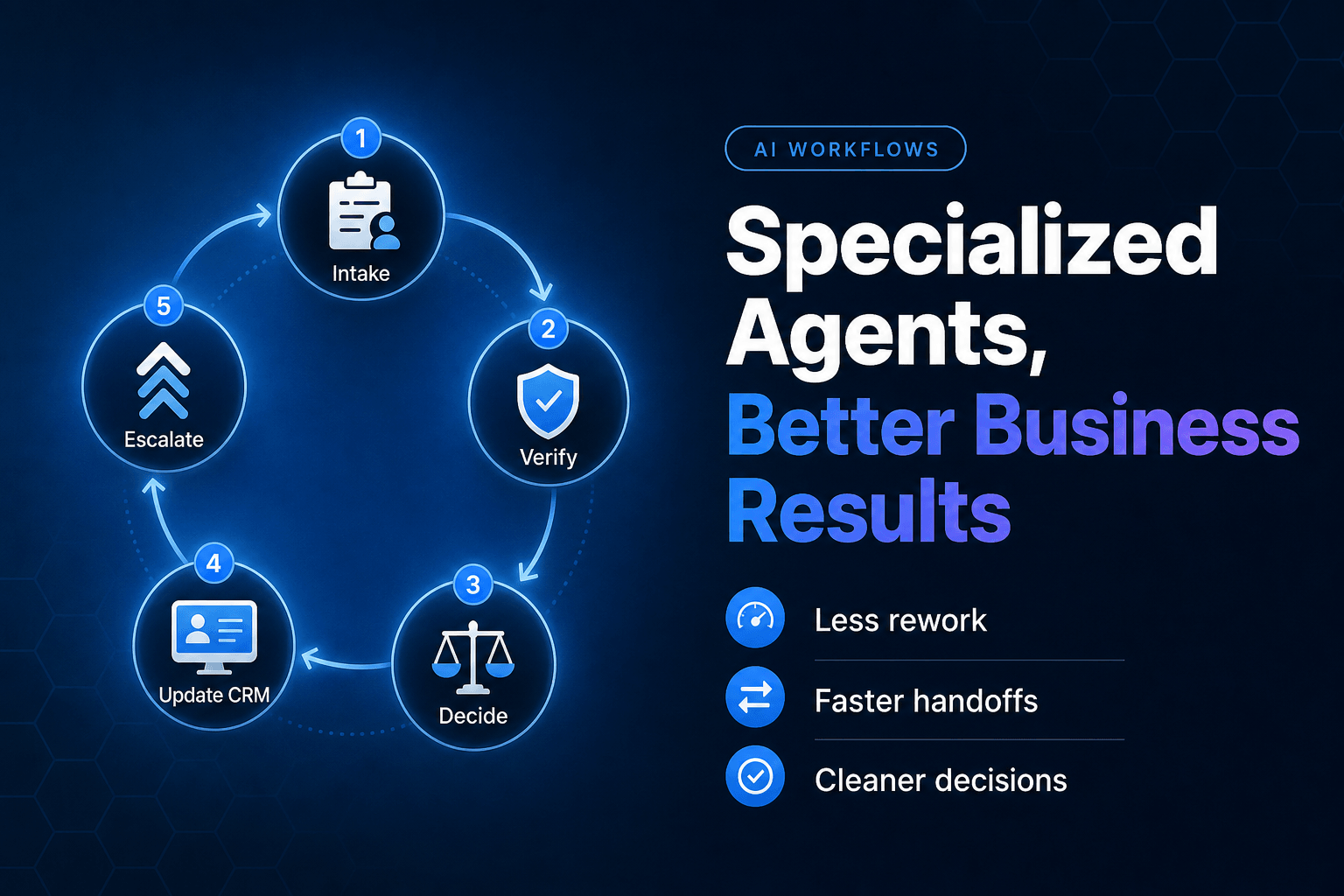
A better workflow assigns the work deliberately:
- An intake agent extracts the request, account ID, urgency, and security signals.
- A knowledge agent retrieves the relevant access and billing policy.
- An account agent checks records in the CRM and subscription system.
- An action agent prepares the approved changes.
- A human reviewer handles exceptions before anything sensitive happens.
Each agent receives a compact packet of verified facts, not an entire conversation transcript and a hopeful shrug. That distinction matters. Shared context should include the customer’s plan, prior commitments, known constraints, and the status of every completed step. Otherwise, the third agent asks the same question the first agent already answered. Very human. Very expensive.
For a closer look at the mechanics, shared memory in multi-agent workflows helps teams reduce duplicate research and keep decisions consistent across a run.
Support gets faster when the reply agent stops playing detective
Customers do not care whether an AI system has one agent or six. They care that they do not have to explain a broken situation twice.
The strongest support workflows separate diagnosis from communication. The agent drafting the reply should not also be responsible for discovering the truth across ticket history, order data, entitlement records, and policy documents. That combination produces polished responses with suspiciously flimsy facts.
In practice, we have found that support teams benefit from a simple division of labor:
- Triage first. Identify intent, urgency, sentiment, account tier, and whether the request involves a refund, security event, cancellation, or legal language.
- Gather evidence second. Pull the exact order, subscription, usage record, policy clause, and prior promises.
- Decide what is allowed. Route requests with clear rules to an action agent. Send ambiguity to a person.
- Draft last. Give the customer-facing agent confirmed facts, approved options, and a clear next step.
That ordering avoids a common embarrassment: an agent promises a refund or access change before it has checked whether either is permitted.
The need for coordination is growing. Salesforce found that organizations use an average of 12 agents, yet 50% of those agents still operate in isolated silos rather than as part of a connected system. Salesforce’s 2026 Connectivity Benchmark Report warns that disconnected agents can create redundant automations and fragmented customer experiences. (salesforce.com)
A multi-agent support flow does not mean a customer gets bounced among robotic personalities. It means the customer sees one clear answer because the backstage work is organized. For teams building that model, agent assist copilots for faster customer support are often a useful first step before expanding into more autonomous workflows.
Internal operations need specialists, not a digital general manager
Operations work is full of small decisions that look harmless in isolation. Together, they determine whether requests move or stall.
Consider a vendor onboarding request. A department submits a form requesting a new software tool. The work might involve checking for an existing contract, comparing the request against approved categories, collecting tax documents, confirming the budget owner, creating a purchase request, and alerting security if the vendor will access customer data.
One broad agent can attempt all of it. It will also need permissions to nearly every system involved, which is a terrible reason to give one model the keys to the building.
A coordinated workflow limits both the scope and the blast radius:
New vendor request
→ Validate required fields
→ Check existing vendors and contracts
→ Classify data-access risk
→ Request missing documentation
→ Route for finance and security approval
→ Create approved procurement record
→ Notify requester
The agent that checks duplicate vendors does not need permission to create purchase orders. The agent that drafts the requester update does not need access to banking details. This is cleaner operational design, but it is also basic risk control.
McKinsey’s 2025 survey found that 23% of respondents said their organizations were scaling an agentic AI system somewhere in the enterprise, while another 39% were experimenting. Yet in any individual business function, no more than 10% reported scaling agents. McKinsey’s 2025 State of AI report captures the awkward middle stage: plenty of interest, limited repeatable execution. (mckinsey.com)
The organizations that get past it tend to automate a real operational sequence, complete with owners, inputs, approval thresholds, and a finish line. A general-purpose “operations agent” sounds impressive in a roadmap meeting. A vendor-request workflow that closes 80% of complete requests without three Slack reminders is more useful.
Content teams need disagreement before publishing, not after
Content is a sneaky multi-agent problem because the output looks like one thing: a blog post, email sequence, landing page, sales deck, or webinar recap.
Behind that output sits a messy chain of work. Someone needs to extract the angle, research claims, check source freshness, apply brand voice, identify gaps, format the draft, and ensure the final piece matches the campaign goal. Asking one agent to perform every role invites a familiar result: a confident, fluent draft that has quietly invented a statistic, ignored a product constraint, and repeated a competitor’s phrasing.
We prefer a workflow where agents have useful friction:
- A planner turns a webinar or campaign brief into a specific content angle.
- A researcher collects source-backed facts and flags weak evidence.
- A writer creates the draft using the approved brief.
- An editor checks voice, structure, and audience fit.
- A reviewer validates claims, links, and product descriptions before publication.
The writer does not get to grade its own homework. Nobody should.
This pattern is especially valuable when content has a short shelf life. A product-launch email drafted from last quarter’s positioning may be grammatically perfect and commercially useless. Give the workflow current campaign context, approved messaging, and a defined review gate.
The practical trick is passing structured artifacts between agents: a brief, source list, fact-check log, draft version, and final approval status. That keeps the workflow from dissolving into five chat threads wearing a trench coat. Teams that want the technical version can study how to design multi-agent workflows with clean handoffs, especially the rules around state, routing, and stop conditions.
More agents can create more chaos, so do not build a tiny robot org chart
Multi-agent workflows are not automatically better. Splitting a simple task among five agents can turn a two-second classification into a 90-second committee meeting.
The point is not to create artificial complexity. The point is to separate work when specialization improves accuracy, reduces permissions, enables parallel tasks, or creates a necessary review point.
There is also a large gap between agent marketing and agent reality. In a 2026 survey of 740 senior executives, Sinequa found that 51% reported AI agents in live production, but only 24% had deployed what its research classified as true agents, including autonomous task execution, tool use, or multi-agent collaboration. Sinequa’s State of Enterprise Agentic AI in 2026 also found that 84% of leaders had encountered products marketed as agents that were really advanced chatbots. (sinequa.com)
That skepticism is healthy.
Before adding another agent, ask four questions:
- Does this step require a different tool, dataset, permission set, or success metric?
- Can it run in parallel with another step?
- Would a second role catch an error the first role is likely to miss?
- Can we explain exactly what gets passed forward?
If the answer is no across the board, keep one agent. There is no prize for building an AI org chart that needs its own holiday party.
Visibility matters, too. LangChain reports that 89% of organizations using agents have implemented some form of observability, while 62% have detailed step-level tracing. LangChain’s agent observability research reflects what implementation teams learn quickly: when several agents collaborate, final output alone is not enough to diagnose a bad run. (langchain.com)
AffinityBots turns agent roles into accountable business work
The useful question is not, “Can we build an agent team?” Almost any modern tool can produce a flashy demo.
Ask whether the system can run the work your business already has: incoming support requests, lead research, approvals, internal tickets, campaign production, CRM updates, and exception handling. Can each agent have a defined role? Can it use only the tools it needs? Can the workflow keep context intact, record what happened, and pause when a person must decide?
That is the difference between a chat trick and an operational system.
AffinityBots is built for teams that need agents to coordinate, not merely respond. You can configure specialized agents with clear instructions, knowledge, memory, and tool access, then connect them in workflows that trigger from real business events. A researcher can prepare account context. A reviewer can validate it. An operator can update the right system. A human can approve the cases that deserve judgment.
The winning workflow is rarely the one with the most agents. It is the one where every agent has a job, every handoff carries the right context, and every action can be traced back to a business outcome.
Build your first coordinated workflow in AffinityBots, then measure the work it removes from your team’s week.
Related Articles
Continue exploring more insights on artificial intelligence